Model Warning on running with GPU

Hi

I get a model warning pointing to Line 209 of the init.py file in the AddaxAI files/env whenever I run AddaxAI. This also causes a long startup time of the model, occassionally timing out AddaxAI and has caused it to crash and (I think) not full utilisation of the GPU’s capability for running analysis.

Typically it does end up running and completing, but with a long delay at the ‘starting algorithm’ stage.

This line relates to CUDA compatibility with the PyTorch version installed which I assume means Addax doesn’t recognise my GPU as compatible my GPU etc.

The GPU is an RTX 5090 with nividia-smi & driver at 581.29 and a CUDA version of 13.

Could AddaxAI be throwing the error because the 5090 is too new and/or not on the compatible list that its PyTorch version has? Or, might Addax be having another issue that also kicks up this error?

Operating at the real edge of my knowledge around CUDA, PyTorch and things I might have assumed about AddaxAI and its PyTorch environment.

Anyone else had a similar issue?

Loving Addax and all that it’s helping with, but just keep hitting this snag.

Cheers

Hi @Andy,

Could you rerun it in debug mode? That will give me some extra information into the errors and tracebacks.

If you could then post it here, that would be great!

Cheers,

Peter

Thanks for getting back, I have the whole, but on a quick read through this seems to be the source of the error:

C:\Users\aoliv\AddaxAI_files\envs\env-pytorch\lib\site-packages\torch\cuda_init_.py:209: UserWarning:
NVIDIA GeForce RTX 5090 with CUDA capability sm_120 is not compatible with the current PyTorch installation.
The current PyTorch install supports CUDA capabilities sm_37 sm_50 sm_60 sm_61 sm_70 sm_75 sm_80 sm_86 sm_90 compute_37.
If you want to use the NVIDIA GeForce RTX 5090 GPU with PyTorch, please check the instructions at https://pytorch.org/get-started/locally/

It appears 4 times in the log, on each detection and classification model activation for a mixed photos and video folder. it may have been the small size of the folder but it did not have the slow model load up times on this test.

I will try a few more folders and see what happens on those.

Full debug hits the character limit so let me know if you want it pasted.

Hi @Andy ,

Thanks for sharing! The problem is that AddaxAI PyTorch build does not yet include support for the CUDA compute capability of the RTX 5090. Upgrading PyTorch is currently quite complex (the conda environments are built by GiHub actions and downloaded as zip files). A real issue since more and more users will be using these new GPU’s.

We could debug this together with the risk of doing it for nothing (I havent seen this before, so I’m not sure what would happen if we upgrade PyTorch), but if you up for it, we can try?

How is your CLI experience? :wink: DO you have a working conda installation and do you have experience with that?
Cheers,

Peter

Cheers for looking at it @petervanlunteren,

Good to know I was close to the marl woth my guess. I have some CLI experience but I’m happy to have a go and learn more, this would probaly be the most complect thing I’ve dealt with using it.

Would this be (if I understand you right) editing the conda environment inside Addax so it’s got the most up to date compatabilites but then see if any other dependancies break.

OR, build an external one and point Addax to it to use instead of its inbuilt one?

Don’t have a conda installation, but at least vaguely aware of it and what it does, just never needed to manage a stack complex enough to need it etc.

Thanks

Andy

Hi @Andy ,

Would this be (if I understand you right) editing the conda environment inside Addax so it’s got the most up to date compatabilites but then see if any other dependancies break.

OR, build an external one and point Addax to it to use instead of its inbuilt one?

We would try to upgrade the PyTorch version inside the existing environment, and see if that works for you. Can you:

Step 1: Install Conda

The simplest option is Miniconda.

  1. Go to: Miniconda - Anaconda
  2. Download the Windows installer (64 bit).
  3. Run it and accept the defaults:
    • “Just me” is fine
    • Keep the default install location
    • Allow it to add to PATH if it asks

After that you will have a program called Anaconda Prompt.


Step 2: Open Anaconda Prompt

  1. Click the Start menu
  2. Search for Anaconda Prompt
  3. Open it

This window is where Conda commands work.


Step 3: Tell Conda where your existing AddaxAI environment is

Your AddaxAI environment lives here:

C:\Users\aoliv\AddaxAI_files\envs\env-pytorch\

Add that folder to Conda’s list of environment locations by running this in Anaconda Prompt:

conda config --append envs_dirs C:\Users\aoliv\AddaxAI_files\envs

Step 4: Activate your environment

Now you can activate it with:

conda activate env-pytorch

If it worked, your prompt will now start with:

(env-pytorch)

Step 5: Check that Python runs inside the environment

Run:

python --version

If you get a version number with no errors, the environment is active and ready.


If Conda still does not see the environment

You can activate it directly by path:

conda activate C:\Users\aoliv\AddaxAI_files\envs\env-pytorch

This works even if Conda has not registered the environment.

All worked perfectly @petervanlunteren

Python version is 3.8.20 which I assume is correct (be aware I have 3.12 & 3.13 also installed, shouldn’t be an issue when this is all contained in Addax but just noting it)

Great! Yes, python 3.8 is what we would expect.

Since we know the env-pytorch environment can be activated, here are the next steps you can follow to get PyTorch to recognise your RTX 5090 properly.

First, make sure the env is activated

Open a new prompt window and activate the env, like you did before. These need to be updated.

conda activate env-pytorch

OR (whatever you prefer)

conda activate C:\Users\aoliv\AddaxAI_files\envs\env-pytorch

Your prompt will now start with:

(env-pytorch)

1. Check what PyTorch is currently using

In the activated environment, run:

python -c "import torch; print('torch:', torch.__version__); print('available:', torch.cuda.is_available()); print('cuda:', torch.version.cuda)"

This confirms which CUDA runtime your current torch build supports.

2. Upgrade PyTorch to a build that supports your GPU

The newest CUDA build available through pip is the cu130 wheel, and that is exactly the one you want to try.

Still in the same environment:

python -m pip install --upgrade pip
pip install --upgrade torch torchvision --index-url https://download.pytorch.org/whl/cu130

This installs the latest PyTorch and torchvision built against CUDA 13, which should recognise the architecture of the 5090.

3. Verify that the GPU is now recognised

Run:

python -c "import torch; print('available:', torch.cuda.is_available()); print('device:', torch.cuda.get_device_name(0) if torch.cuda.is_available() else 'no gpu')"

If the upgrade worked, you should see:

  • available: True
  • device: NVIDIA GeForce RTX 5090

How does this go?

@petervanlunteren

For CUDA runtime:

torch: 2.3.0+cu118
available: True
cuda: 11.8

Updating pip worked fine but I get a list of “Requirement already satisfied” arguments back when trying to update torch:

(env-pytorch) C:\Users\aoliv>pip install --upgrade torch torchvision --index-url https://download.pytorch.org/whl/cu130
Looking in indexes: https://download.pytorch.org/whl/cu130
Requirement already satisfied: torch in c:\users\aoliv\addaxai_files\envs\env-pytorch\lib\site-packages (2.3.0+cu118)
Requirement already satisfied: torchvision in c:\users\aoliv\addaxai_files\envs\env-pytorch\lib\site-packages (0.18.0+cu118)
Requirement already satisfied: filelock in c:\users\aoliv\addaxai_files\envs\env-pytorch\lib\site-packages (from torch) (3.13.1)
Requirement already satisfied: typing-extensions>=4.8.0 in c:\users\aoliv\addaxai_files\envs\env-pytorch\lib\site-packages (from torch) (4.12.2)
Requirement already satisfied: sympy in c:\users\aoliv\addaxai_files\envs\env-pytorch\lib\site-packages (from torch) (1.13.3)
Requirement already satisfied: networkx in c:\users\aoliv\addaxai_files\envs\env-pytorch\lib\site-packages (from torch) (3.0)
Requirement already satisfied: jinja2 in c:\users\aoliv\addaxai_files\envs\env-pytorch\lib\site-packages (from torch) (3.1.6)
Requirement already satisfied: fsspec in c:\users\aoliv\addaxai_files\envs\env-pytorch\lib\site-packages (from torch) (2024.6.1)
Requirement already satisfied: mkl<=2021.4.0,>=2021.1.1 in c:\users\aoliv\addaxai_files\envs\env-pytorch\lib\site-packages (from torch) (2021.4.0)
Requirement already satisfied: numpy in c:\users\aoliv\addaxai_files\envs\env-pytorch\lib\site-packages (from torchvision) (1.24.1)
Requirement already satisfied: pillow!=8.3.,>=5.3.0 in c:\users\aoliv\addaxai_files\envs\env-pytorch\lib\site-packages (from torchvision) (10.2.0)
Requirement already satisfied: intel-openmp==2021.
in c:\users\aoliv\addaxai_files\envs\env-pytorch\lib\site-packages (from mkl<=2021.4.0,>=2021.1.1->torch) (2021.4.0)
Requirement already satisfied: tbb==2021.* in c:\users\aoliv\addaxai_files\envs\env-pytorch\lib\site-packages (from mkl<=2021.4.0,>=2021.1.1->torch) (2021.11.0)
Requirement already satisfied: MarkupSafe>=2.0 in c:\users\aoliv\addaxai_files\envs\env-pytorch\lib\site-packages (from jinja2->torch) (2.1.5)
Requirement already satisfied: mpmath<1.4,>=1.1.0 in c:\users\aoliv\addaxai_files\envs\env-pytorch\lib\site-packages (from sympy->torch) (1.3.0)

So when checking the GPU compatability after that it still gives the warning:

(env-pytorch) C:\Users\aoliv>python -c “import torch; print(‘available:’, torch.cuda.is_available()); print(‘device:’, torch.cuda.get_device_name(0) if torch.cuda.is_available() else ‘no gpu’)”
available: True
C:\Users\aoliv\AddaxAI_files\envs\env-pytorch\lib\site-packages\torch\cuda_init_.py:209: UserWarning:
NVIDIA GeForce RTX 5090 with CUDA capability sm_120 is not compatible with the current PyTorch installation.
The current PyTorch install supports CUDA capabilities sm_37 sm_50 sm_60 sm_61 sm_70 sm_75 sm_80 sm_86 sm_90 compute_37.
If you want to use the NVIDIA GeForce RTX 5090 GPU with PyTorch

warnings.warn(
device: NVIDIA GeForce RTX 5090

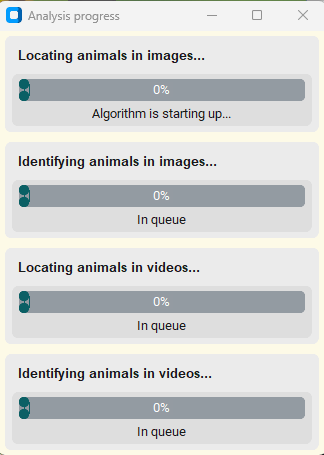
Hmmm. That shows us that your GPU is being used! Can you try running AddaxAI again? What does it show in the progress bar window?

Yes GPU is used, but I always get the warning file produced due to the incompatability in versions and Addax can get stuck for long periods at the 'Algorithm is starting up" stage:

I just ran a test on a sample folder I repeated use to check and it was stuck there for about 4-5 mins, then runs with the GPU.

Is cu130 a dev or nightly build? Would cu124 also cover the 5090 and be more stable?

Is cu130 a dev or nightly build? Would cu124 also cover the 5090 and be more stable?

We actually didn’t install a new PyTorch (it just checked and said: it’s already installed). It already gave us the GPU: True, so I thought it was solved anyway.

The real problem is with the python interpreter being 3.8, which is quite old, especially for a 5080.

Just to confirm: it does run on GPU, but it takes a long time starting up before it starts processing?

Yes it always did run with the GPU before these attempts at fixes (once I had a GPU to use, I had used it previously on CPU only and no errors etc).

It gave the model warning and then (I assume) was able to use the 5090 but not to it’s full ability. it would recognise there was a CUDA capable GPU but also say the version of PyTorch installed didn’t support the 5090 etc.

And yes the models can take varying amounts of time to start, and sometimes AddaxAI goes into a ‘Not Responding’ state during this time and the whole thing would crash if you tried to interact with it or accidentally clicke don it. Again, only working on assumptions but I thought it was a result of the version incompatabilities.

That the GPU is still used suggests that there’s some fallback it finds after timing out and taking time to start the model. It has happened with all models I’ve tried; Megadetector, DeepFaun, SpeciesNet etc.

On the cu130 thing I was just asking that it maybe didn’t work because pip doesn’t consider cu130 a stable release and so skipped it all.

But I don’t fully understand how it all works and fits together with dependancies and verisons.

I see! I believe we may have hit a point where my conda environment is too old for the modern hardware :frowning: But let’s debug a bit further to make sure.

Force reinstall

Like you did before, in the activated conda env, could you run:

pip install --upgrade --force-reinstall torch torchvision --index-url https://download.pytorch.org/whl/cu130

Check what it says now

then check with:

python -c "import torch; print('available:', torch.cuda.is_available()); print('device:', torch.cuda.get_device_name(0) if torch.cuda.is_available() else 'no gpu')"

What do you see ?

@petervanlunteren ,Unfortunately it gives some errors:

ERROR: Could not find a version that satisfies the requirement torch (from versions: none)
ERROR: No matching distribution found for torch

Hi @Andy ,

That is what I feared. This is a structural issue with AddaxAI’s current PyTorch environment. It’s too old for you new GPU. I will be updating this, but that will only be done in the next major version, and that can still take some time (a few weeks, months?).

If you really feel like using the GPU, you can use the MegaDetector tools directly: GitHub - agentmorris/MegaDetector: MegaDetector is an AI model that helps conservation folks spend less time doing boring things with camera trap images.

That gives you full control over all the settings and package versions.

Sorry! Hope you understand.

Cheers,

Peter

Cheers @petervanlunteren for having a look into it and talking me through the conda stuff.

For now it’s not a dealbreaking issue, more an inconvienience, will be super happy when it gets sorted and in the meantime thanks for all the work you’ve put into this :slight_smile:

No worries @Andy! Hopefully soonish we’ll have the new version working :slight_smile: