Reproduce AddaxAI classifier in Python?

Hey everyone!

I am trying to reproduce the second step (run the classifier in the cropped objects) of the AddaxAI platform by myself in Python because I want to access some final layers of the model to test some OOD/anomaly detection methods. However, I’m not being able to get the same results.

First, I selected a subset of 80 images and have passed them into the AddaxAI entire workflow with Megadetector 5a and Southwest USA model.
Then, I exported the cropped objects from the Megadetector 5a and tried to implement the SouthwestUSA model by myself in Python (downloaded here)
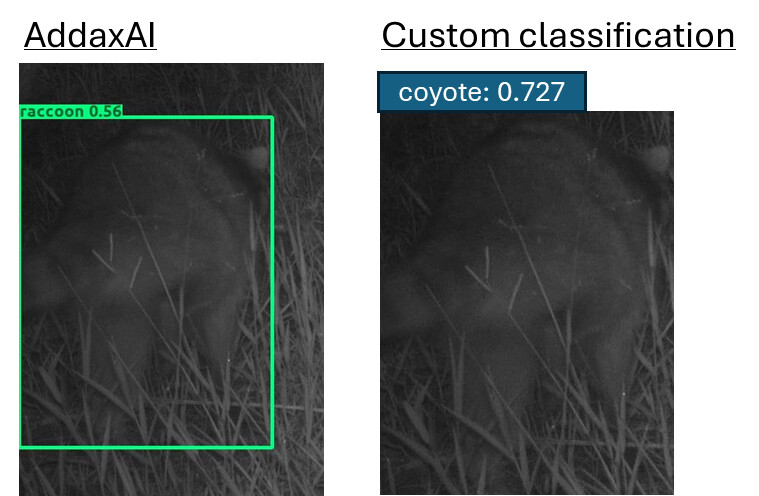
Most of the predicted classes are the same, but the confidence scores are often quite different. I am reshaping the cropped images to 299x299 as recommended.

One difference I realized that it is related to the “unidentified animal” class because the classification score is below the classification threshold, and thus the exported result shows the detection score rather than the classification score.
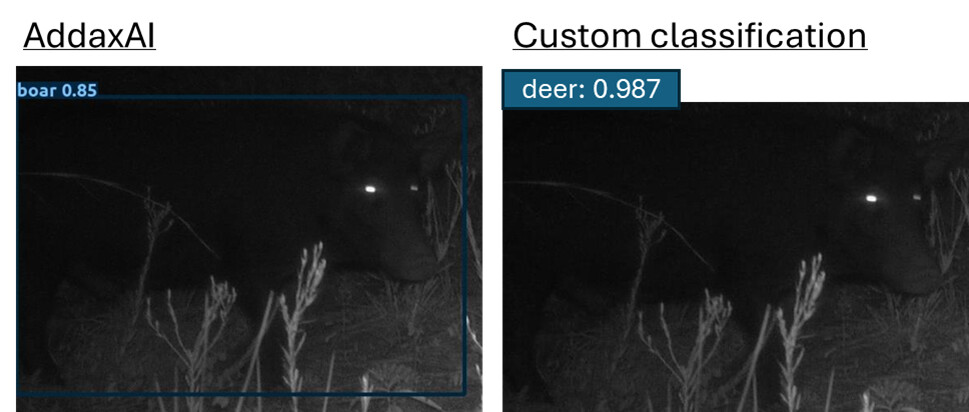
However, for many images the classification score is quite different and for a few images the predicted class is different. For example:

Is the “sdzwa_southwest_v3.pt” file, that is provided in the link, correct? Is it different from the model used in AddaxAI?
Or I’m missing a preprocessing step in the classification pipeline?

I would greatly appreciate any insights/thoughts on this.
Thanks!!

Ismael

Hi @ismaelvbrack ,

It is very hard to tell you what is going on without knowing your code, but
I can help you to understand what happens in AddaxAI under the hood. See below some information that might help debugging.

AddaxAI uses this information regarding the Southwest USA v3 - San Diego Zoo Wildlife Alliance model, including the URLs to the exact models used: AddaxAI/model_info/model_info_v5.json at main · PetervanLunteren/AddaxAI · GitHub

This is the inference script: AddaxAI/classification_utils/model_types/sdzwa-pt/classify_detections.py at main · PetervanLunteren/AddaxAI · GitHub

As you can see, the image size in AddaxAI is also 299*299: AddaxAI/classification_utils/model_types/sdzwa-pt/classify_detections.py at main · PetervanLunteren/AddaxAI · GitHub

In order to reproduce, pay special attention to:

The model and those functions are then send to the main inference script: AddaxAI/classification_utils/inference_lib.py at main · PetervanLunteren/AddaxAI · GitHub

Here the actual processing is done, and the results depend on your AddaxAI settings (confidence thresholds (see: Understanding confidence thresholds in AddaxAI), disabled species (see: AddaxAI/classification_utils/inference_lib.py at main · PetervanLunteren/AddaxAI · GitHub), whether or not you enabled taxonomic aggregation (see: AddaxAI/classification_utils/inference_lib.py at main · PetervanLunteren/AddaxAI · GitHub), etc).

Hope this helps! Let me know if you need more information.

Cheers,

Peter

Hi Peter,

Thank you very much for your quick and detailed response! That helps a lot!

I implemented the model following the code in GitHub that you shared (see below).
However, I am still getting the same results that are different in comparison to when I run it directly on AddaxAI.

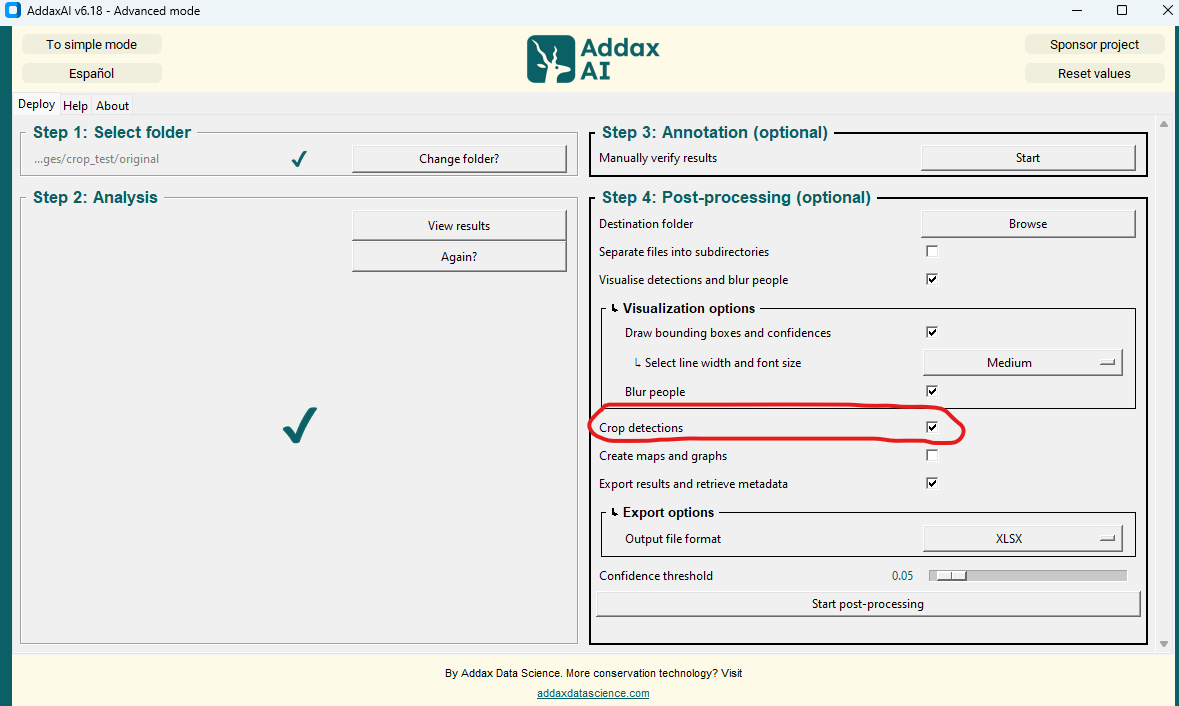
I’m suspecting that this difference could be related to the cropping procedure. I’m running the MegaDetector 5a in AddaxAI and cropping the animal objects by selecting the option “Crop detections” in the “Step 4: Post-processing”:

Then, I’m running the classifier in Python importing these cropped images.

Is the cropping method the same as in the code you shared?
Or am I missing another step in here?

# Imports
import os
import torch
import pandas as pd
import torch.nn as nn
import torch.nn.functional as F
from torchvision import transforms
from torchvision.models import efficientnet
import torchvision.transforms as transforms
from PIL import Image

# Load class names from CSV
classes = pd.read_csv('SouthwestUS/sdzwa_southwest_v3_classes.csv') 
num_classes = len(classes)
num_classes

# Running in CPU mode
device_str = "cpu"

# Define path for model
efficientnet_pth_fpath = 'SouthwestUS/efficientnet_v2_m-dc08266a.pth'

# Define path for model weights
cls_model_fpath = "SouthwestUS/southwest_v3.pt"

# Define path for images
image_folder = "crop_test/cropped"

# Initialize the model
class EfficientNet(nn.Module):

    def __init__(self, num_classes, tune=True):
        '''
            Construct the model architecture.
        '''
        super(EfficientNet, self).__init__()
        self.avgpool = nn.AdaptiveAvgPool2d(1)
        self.model = efficientnet.efficientnet_v2_m(weights=None)
        self.model.load_state_dict(torch.load(efficientnet_pth_fpath, map_location=torch.device(device_str)))
        if tune:
            for params in self.model.parameters():
                params.requires_grad = True
        if tune:
            for params in self.model.parameters():
                params.requires_grad = True
        num_ftrs = self.model.classifier[1].in_features
        self.model.classifier[1] = nn.Linear(in_features=num_ftrs, out_features=num_classes)
        self.model.to(torch.device(device_str))

    def forward(self, x):
        '''
            Forward pass (prediction)
        '''
        x = self.model.features(x)
        x = self.avgpool(x)
        x = torch.flatten(x, 1)
        prediction = self.model.classifier(x)
        return prediction

# Load model
model = EfficientNet(len(classes), tune=False)
checkpoint = torch.load(cls_model_fpath, weights_only=False, map_location=torch.device(device_str))
model.load_state_dict(checkpoint['model'])
model.to(torch.device(device_str))
model.eval()
model.framework = "EfficientNet"
device = torch.device(device_str)

# Image preprocessing 
preprocess = transforms.Compose([
    transforms.Resize((299, 299)),
    transforms.ToTensor(),
])

# Create a function to run the classifier
def get_classification(PIL_crop):
    input_tensor = preprocess(PIL_crop)
    input_batch = input_tensor.unsqueeze(0)  
    input_batch = input_batch.to(device)
    output = model(input_batch)

    probabilities = F.softmax(output, dim=1)
    probabilities_np = probabilities.cpu().detach().numpy()
    confidence_scores = probabilities_np[0]
    
    classifications = []
    for i in range(len(confidence_scores)):
        pred_class = classes.iloc[i].values[1]
        pred_conf = confidence_scores[i]
        classifications.append([pred_class, pred_conf])
    return classifications

# Run classifier on all images in folder
results = []
image_files = [f for f in os.listdir(image_folder) if f.endswith('.JPG')]

for fname in image_files:
    img_path = os.path.join(image_folder, fname)
    img = Image.open(img_path)

    classifications = get_classification(img)

    row = {'filename': fname}
    for pred_class, pred_conf in classifications:
        row[pred_class] = pred_conf
    # Find the class with the highest confidence
    best_pred = max(classifications, key=lambda x: x[1])
    row['predicted_class'] = best_pred[0]
    row['confidence'] = float(best_pred[1])
    results.append(row)

resu_df = pd.DataFrame(results)

Hi @ismaelvbrack,

I can’t say for sure, but I am quite confident that it indeed has to do with the cropping or preprocessing of the detections.

Is there any specific reason for you to run the classifier your self on the crops?

Cheers,

Peter

Thanks Peter! I will try to implement the 2 steps in Python then, to see if I can get the same results.

We are exploring some out-of-distribution detection approaches to detect, for example, species for which the model was not training (e.g., armadillos here in Florida).
For some of these methods, we need the extracted features from the dense layer right before the classifier part. Then, I was trying to export these vectors of features to test these OOD detection methods.

Regarding the SouthwestUSAv3 model, one thing that I noticed is that there is a “other” class, but I could not find more information about. Do you know if this model was trained specifically including this class or if there is a different procedure to define “other” species?

Best,
Ismael

Hi @ismaelvbrack,

Yes, the “other” class is baked in, which means the developers have indeed grouped some animals together into a “other” class. I do not know which animals that were.

I think it would be better for your use-case to skip AddaxAI all together and just go to the source code: GitHub - conservationtechlab/animl-py: Animl comprises a variety of machine learning tools for analyzing ecological data. This Python package includes a set of functions to classify subjects within camera trap field data and can handle both images and videos.

You’ll find that Kyra Swanson is one of the developers: tkswanson (Kyra Swanson) · GitHub

She’ll be better fit to answer any model related questions!

1 Like

Hi @petervanlunteren !

I’m still a bit lost trying to implement the Southwest USA v3 model.
In the folder (Addax-Data-Science/SWUSA-SDZWA-v3 at main), I see two files that could correspond to the model architecture and/or weights:

"./southwest_v3.pt"
"./efficientnet_v2_m-dc08266a.pth"

Digging into the AddaxAI code that you shared with the inference script (AddaxAI/classification_utils/model_types/sdzwa-pt/classify_detections.py at fc5f0d2e8bee2af3eed1960afb4cbb33be43e48e · PetervanLunteren/AddaxAI · GitHub), it seems the only file that is being used is the "efficientnet_v2_m-dc08266a.pth. Am I seeing this correctly? Does this file contain the trained weights of the SouthwestUSAv3 model? What is the other file southwest_v3.pt?

Thanks a lot for your help!

Best,
Ismael

Hi @ismaelvbrack,

That is indeed a bit confusing. Let me explain the two files and what they do.

  • southwest_v3.pt = the trained weights
  • efficientnet_v2_m-dc08266a.pth = the underlying model architecture and its pretrained checkpoint

To run inference, we need both. The reason you couldn’t find the southwest_v3.pt part in the code, is that it is hidden as the variable cls_model_fpath. See lines 17 and 105 in the inference script

We need to load both files, which happens on lines 43 and 105.
Does that help?