Hello!
I have a NVIDIA 4080 currently running the studio driver. I keep getting these error messages when trying to run SpeciesNet, do I need to download something else in order to be able to use the model? Thanks!
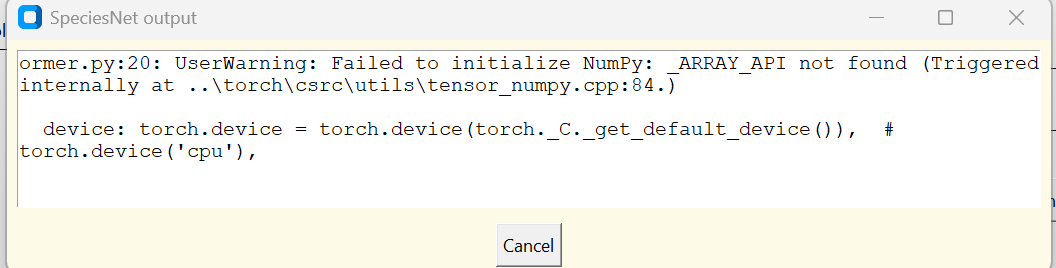
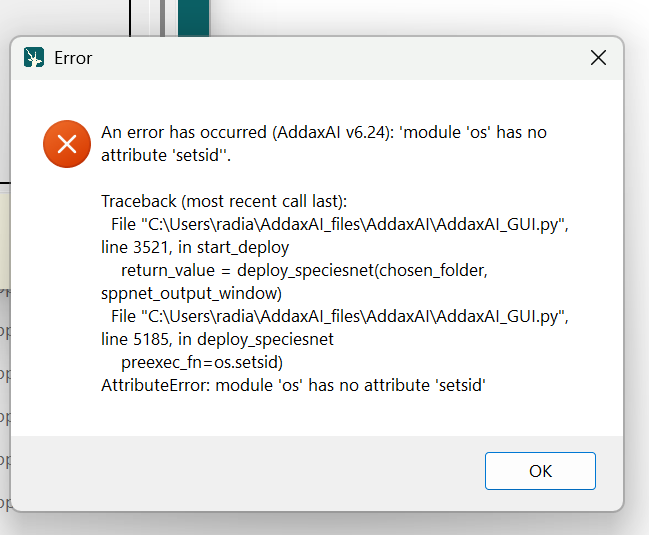
@petervanlunteren , I don’t know how easy it is to run pip commands in the environment AddaxAI is using to run SpeciesNet, but I’d like to get a look at the numpy and torch versions, then after collecting those versions, if the torch version is <2.3.1, I’d like to try pip installing torch>=2.3.1, then trying AddaxAI again. Can you advise @kbarone on how to open a command prompt in the environment that AddaxAI sees?
This is only related to the first issue (_ARRAY_API not found); the second issue (no attribute ‘setsid’) does not appear to be related to SpeciesNet.
Hi @kbarone @agentmorris,
I don’t know how easy it is to run pip commands in the environment AddaxAI is using to run SpeciesNet
Not super user-friendly, but these are the steps. It requires an external tool (conda), and a few CLI commands.
The steps below activate the environment and upgrade torch if the version is <2.3.1.
Step 1: Install Conda
The simplest option is Miniconda.
- Go to: Miniconda - Anaconda
- Download the Windows installer (64 bit).
- Run it and accept the defaults:
• “Just me” is fine
• Keep the default install location
• Allow it to add to PATH if it asks
After that you will have a program called Anaconda Prompt.
Step 2: Open Anaconda Prompt
- Click the Start menu
- Search for Anaconda Prompt
- Open it
This window is where Conda commands work.
Step 3: Activate your environment
Now you can activate it with:
conda activate C:\Users\radia\AddaxAI_files\envs\env-speciesnet
If it worked, your prompt will now start with:
(env-speciesnet)
Step 4: Check that Python runs inside the environment
Run:
python --version
If you get a version number with no errors, the environment is active and ready.
Step 5: Check numpy and torch versions
With the environment active, run:
python -c "import numpy, torch; print('numpy:', numpy.__version__); print('torch:', torch.__version__)"
Step 6: If torch is older than 2.3.1, upgrade it
First, based on the version you just saw, decide if an upgrade is needed.
If the printed torch version is less than 2.3.1, run this command from the Anaconda Prompt, not inside Python:
python -m pip install --upgrade "torch>=2.3.1"
This will install a newer torch version that satisfies the requirement.
Step 7: Verify the upgrade
After pip finishes, recheck the version:
python -c "import torch; print(torch.__version__)"
Confirm that it now shows 2.3.1 or newer.
Now try to open AddaxAI again and see if it works.
Hey @petervanlunteren and @agentmorris !
Thanks for getting back to me! Thanks for the instructions to access the Addax AI SpeciesNet env. I was able to get SpeciesNet to run through AddaxAI by downgrading my numpy version.
Previously numpy and torch versions were:
numpy: 2.3.3
torch: 2.7.1+cu118
A few days ago I got the below error when running SpeciesNet through code.
ERROR: pip's dependency resolver does not currently take into account all the packages that are installed. This behaviour is the source of the following dependency conflicts. shapely 2.0.3 requires numpy<2,>=1.14, but you have numpy 2.3.3 which is incompatible.
I downgraded numpy in SpeciesNet through Miniforge previously and was able to use SpeciesNet in Miniforge. I did the same in the AddaxAI SpeciesNet env with the following and AddaxAI now works wonderfully with SpeciesNet!
This is the command I used to downgrade numpy:
python -m pip install --upgrade "numpy<2.0"
Now running :
numpy: 1.26.4
torch: 2.7.1+cu118
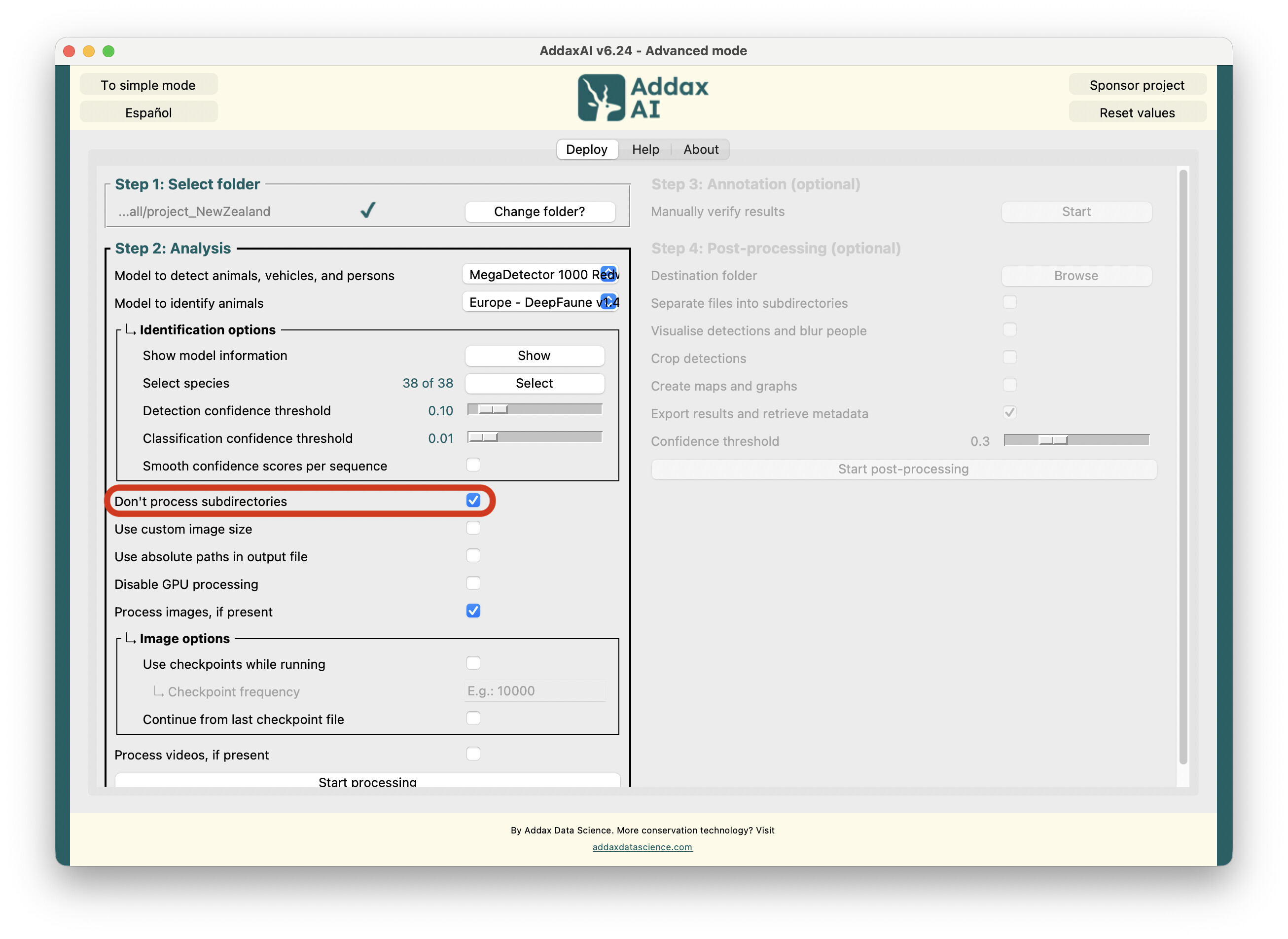
Side note- Is there a way to run AddaxAI recursively through folders?
Appreciate the help!!
Kaitlyn
Hi @kbarone,
I can’t say I follow the exact details of the package conflicts (Dan is your man here  ), but I believe it is solved now?
With regards to this
Is there a way to run AddaxAI recursively through folders?
Yes, and it should do that automatically. Do you by any chance have the ‘Don’t process subdirectories’ feature enabled?
Re: numpy/torch versions…
Well, I guess all’s well that ends well, but I don’t have a great explanation for what happened here. I was expecting to see an older version of PyTorch, in which case everything here would make sense, but PyTorch 2.7 should be compatible with numpy 2.3.
For posterity, as of today, when I installed SpeciesNet (outside of AddaxAI) in a fresh environment, I get torch 2.7.1+cu118 and numpy 2.3.5, and it worked fine, then I installed numpy 2.3.3 to match Kaitlyn’s settings, and that worked fine too.
We may never totally know what happened here, but this is a useful data point; I will keep an eye out for incompatibilities that suggest that we should change the dependency requirements for SpeciesNet (and/or MegaDetector).
Thanks for reporting this, and glad we found a solution!